IIS failed to compress static files
There is a bug between antivirus and IIS for compressing static files. First thing to check is to disable anti virus programm on server,
In case of manual configuration:
<httpCompression>
  <staticTypes>
    <add mimeType="text/*" enabled="true" ></add>
    <add mimeType="message/*" enabled="true" ></add>
    <add mimeType="application/javascript" enabled="true" ></add>
    <add mimeType="application/x-javascript" enabled="true" ></add>
    <add mimeType="image/jpeg" enabled="true" ></add>
    <add mimeType="image/png" enabled="true" ></add>
    <add mimeType="image/svg" enabled="true" ></add>
    <add mimeType="*/*" enabled="false" ></add>
  </staticTypes>
  <dynamicTypes>
    <add mimeType="text/*" enabled="true" ></add>
    <add mimeType="message/*" enabled="true" ></add>
    <add mimeType="application/javascript" enabled="true" ></add>
    <add mimeType="application/x-javascript" enabled="true" ></add>
    <add mimeType="image/jpeg" enabled="true" ></add>
    <add mimeType="*/*" enabled="false" ></add>
  </dynamicTypes>
  <scheme name="gzip" dll="%Windir%\system32\inetsrv\gzip.dll"
  staticCompressionLevel="8" ></scheme>
</httpCompression>
set compression threshold
We had a similar issue on Windows 2012 R2 server; following below steps solved our problem:
Select an IIS site, and go to Configuration Editor.
Select “system.web/caching/outputCache” section, then set the “omitVaryStar” property to “true”
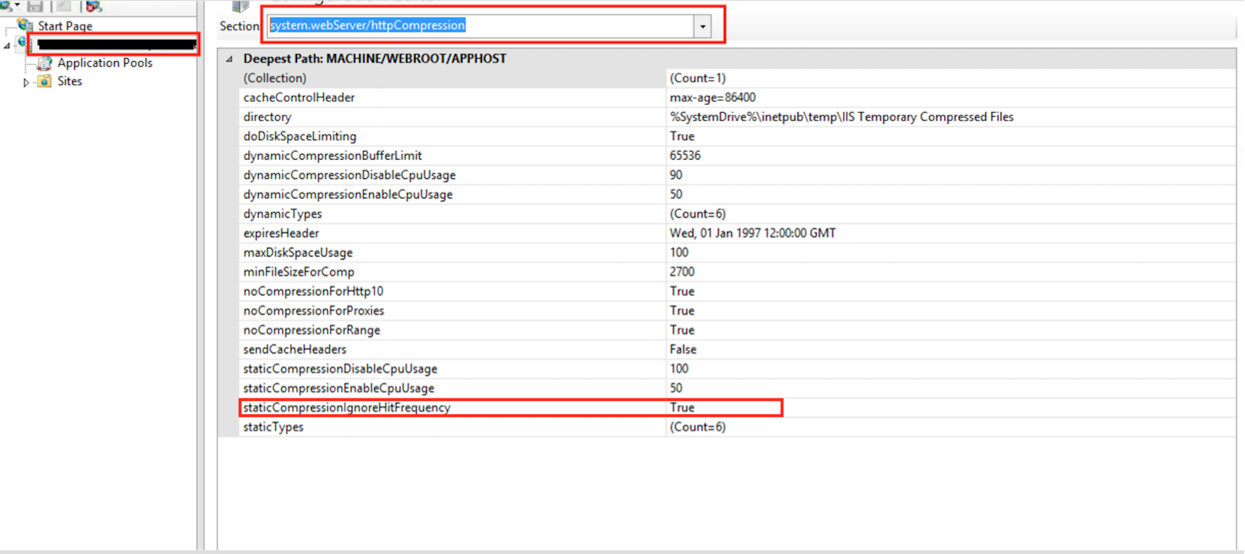
Select system.webServer, and then select httpCompression.
set “staticCompressionIgnoreHitFrequency” property to “true” enter image description here
iisreset