
If you are using IIS, then do the following to setup compression(The following have some snippets from Scott Hanselman’s blog post):
Enabled the “Dynamic Compression” feature in IIS.
Back in IIS Manager, go to the page for the SERVER, not the SITE. Click on Configuration Editor:
From the dropdown, select system.webServer/httpCompression: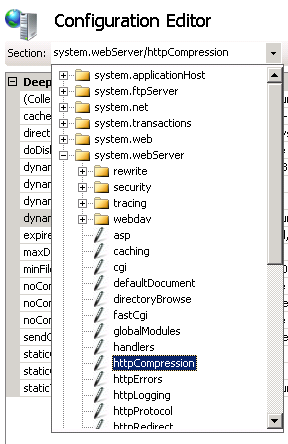
Then click on Dynamic Types and now that you’re in the list editor, think about what types you want compressed. By default / is False, but you could just turn that on. I chose to be a little more picky and added application/atom+xml, application/json, and application/atom+xml;charset=utf-8 as seen below. It’s a little gotcha that application/atom+xml and application/atom+xml;charset=utf-8 are separate entries. Feel free to add what ever mimeTypes you like in here.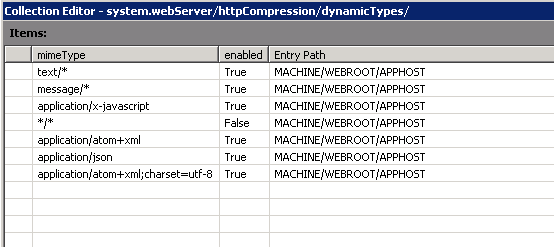
After you’ve added them and closed the dialog, be sure to click Apply and Restart your IIS Service to load the new module.
Now make requests using Accept-Encoding header and you should see the response as expected.
EDIT ( in addition to above include “application/json; charset=utf-8” to cover both json formats)